
Crystal & Frequency Control Componentssales@mecxtal.com.cn0755-26500570
Procurement and Selection · November 4, 2026

A BOM-to-RFQ Checklist for Crystal and Oscillator Part Numbers

Updated November 17, 2026 · 1 technical case added

The first step in quoting a crystal or oscillator is to identify the exact device. Parts from the same manufacturer can differ in voltage, package, output, and temperature range, even within the same series. MERLIN recommends using a shared list of complete part numbers for engineering and procurement before discussing samples, quantities, and delivery.

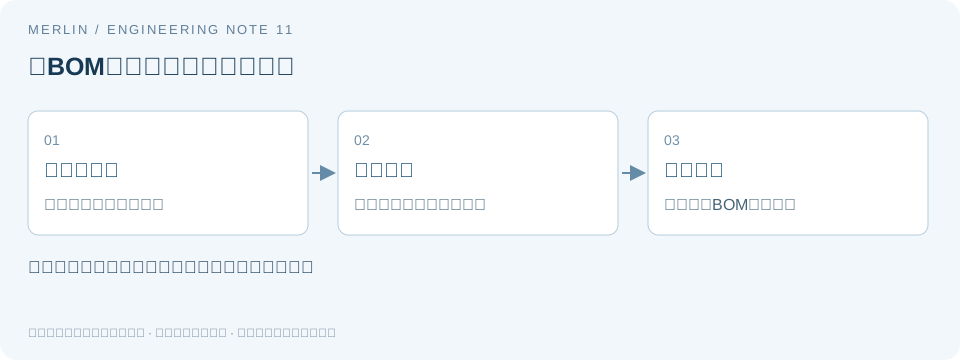
Retaining the complete part number from BOM to RFQ
Original diagram (Chinese labels). MERLIN redrew this diagram using the article and the cited manufacturer documentation. Manufacturer reference 1 ↗ Manufacturer reference 2 ↗ The diagram shows how the checks relate. See the relevant sections for values and applicability.

1. Match the manufacturer, order code, and datasheet

Keep the manufacturer name in English and the complete part number from the BOM, including hyphens, decimal places in the frequency field, and trailing letters. A photograph of the top marking can help identify the device. Use the manufacturer’s full ordering information to confirm it. EPSON’s official ordering instructions specify the Product Number. For other manufacturers, use their corresponding official order-code rules.

2. Identify the type of procurement request

For an exact branded part, check the original manufacturer documentation and use the specified part number. For selection by specification, establish the device type and interface before screening candidates. For alternate-part evaluation, retain both complete part numbers, record differences, and validate before deciding. Record inquiry, inventory confirmation, and alternate-part qualification as distinct steps.

What to include for each manufacturer

Pericom / SaRonix-eCERA— Preserve historical brand names and the original part number. Check current documentation and suffixes.

TXC— Provide the manufacturer name in English, full order code, and datasheet to distinguish it from similarly named companies.

TAITIEN— Confirm the manufacturer name in English and the order code from the BOM.

EPSON— Check the product name and complete Product Number, including all specification suffixes.

SiTime— Check frequency, voltage, output, temperature range, and function in the configuration code.

PDI— Keep the existing part number, document revision, and technical requirements that must be met.

KDS (Daishinku)— Compare the full part number with the package drawing, and use the complete ordering information for purchase.

HOSONIC— Check frequency, device type, suffixes, and the original datasheet.

SCTF— List the specified manufacturer part and any alternate candidates separately.

CREC— Confirm parameters and procurement terms for the exact part number.

Fields to retain in the BOM

FieldWhat to record
Original requestKeep the original customer wording and record the verified manufacturer and complete part number separately.
Technical basisRetain the original datasheet revision, frequency, package, temperature range, and device type.
Device-specific parametersFor passive crystals, list CL, ESR, and drive requirements. For active oscillators, list supply, output, and enable behavior.
Procurement termsList quantities for samples, pilot builds, and production separately, along with the target date and packaging requirements.
Alternate-part requirementsRecord the parameters that must match, allowed differences, and the planned validation steps.

When you know only an abbreviation or a similar-sounding name

Check a packaging label, original part number, or English trademark against the relevant manufacturer documentation. This helps distinguish manufacturers, device types, and suppliers. If all you have is a photograph, mark the part number as pending verification and confirm it before issuing a purchase order.

What to send MERLIN

“Specified manufacturer ___, complete part number ___, datasheet revision ___, sample or pilot-build quantity ___, estimated production volume ___, target delivery date ___, alternates accepted ___.” Shenzhen Merlin Electronics Co., Ltd. can use these details to start the inquiry. Price, lead time, availability, and traceability documents are verified against the exact part number. Confirm stock and availability separately for each part.

Procurement FAQ

Can I get a quote with just the manufacturer name?

Include the complete order code, quantity, and delivery date. If the part number is unknown, provide the device type and technical requirements first.

Can I send only a photo of the top marking?

The photo can help identify the part. Confirm the complete part number and original datasheet before relying on any specification.

Manufacturer documentation and further reading

This guide covers procurement information and general selection. Confirm design requirements against current documentation for the target device and host chip.

Next steps

Sales contact · Shenzhen Merlin Electronics Co., Ltd. · MERLIN · sales@mecxtal.com.cn · 0755-26500570

Submit a complete part number and procurement requirements

Checking EPSON Order Codes by Device Type and BOM Differences

EPSON parts with matching frequencies and similar packages can serve different electrical functions. For an engineering change, identify the relevant fields in each complete order code. Use the full numbers in the BOM and resolve suffixes from documentation before comparing.

1. Identify the device type, then consult the series documentation

A crystal unit requires an external oscillator circuit. An active oscillator contains the circuit and provides an output. TCXOs, VCXOs, and RTC modules may add compensation, tuning, or register functions. The required ordering fields vary by device type. Identify how the part is connected in the circuit, then find the ordering rules on the relevant manufacturer series page.

A four-pad crystal may have case-ground connections, while a four-pad active part needs power and output connections. Verify the category before comparing details such as frequency error.

2. Record the complete code and PCB part markings separately

A reel label, purchasing BOM, and top marking can each contain different levels of detail. Save the original text and photographs separately, then use the manufacturer’s order-code guide to identify each field. Preserve unknown suffixes exactly as shown and flag their meaning for confirmation.

A series can list multiple frequency and output options. Verify the specific combination of frequency, temperature range, stability, and packaging against the guaranteed conditions for that exact order code.

3. Use separate comparison tables by device type

For a passive crystal, include at least nominal frequency, load conditions, maximum ESR, allowable drive, temperature range, frequency-error definition, package outline, and land pattern. For an active part, include at least supply, output standard, load, logic levels, pin functions, startup time, and frequency guarantee conditions.

Use four columns for the original guaranteed value, candidate guaranteed value, location in manufacturer documentation, and result. Keep typical values separate from guaranteed maxima and minima. Mark missing specifications as unverified and resolve them with documentation.

4. Work through a hypothetical suffix difference

Suppose the original and candidate BOM entries differ only in the last two characters. Look up those characters in the manufacturer’s rules for the specific series and check whether they affect electrical parameters, temperature range, screening, or packaging. If the rules omit the meaning, ask the manufacturer or supplier to confirm the applicable specification.

If the difference is packaging only, check tape orientation, reel quantity, and assembly equipment requirements. If the output or pinout differs, return to circuit review. The example describes a difference between codes without assigning fictional EPSON part numbers that could be mistaken for real ones.

5. Keep acceptance decisions traceable to the manufacturer documentation

After comparing specifications, validate sample electrical and functional behavior. Retain the datasheet revision, full part number, board details, and test records. Record documentation review, sample approval, and supply confirmation separately. Verify any brand authorization, stock, or lead time through the appropriate records.

Check and record table

Device type or changeExamples of required checksInsufficient information
Passive crystalCL, ESR, drive, frequency error, and land patternManufacturer and frequency alone
Active oscillatorVCC, output, load, enable, and startupOutline and frequency alone
Temperature-compensated or voltage-controlled deviceStability conditions, tuning function, and tuning rangeSeries landing page alone
Packaging changeFull ordering rules, tape orientation, and assembly requirementsAssumed suffix meaning

References and applicability

This technical analysis uses public documentation and was prepared with AI assistance. All worked examples are hypothetical. They do not establish product specifications, measured results, or compatibility. For a specific device, use the exact ordering configuration, the latest manufacturer datasheet, and board-level validation.

See the manufacturer reference Epson Crystal Device technical terms and applicable conditions.

Related selection guides

For help documenting these parameters in a BOM or RFQ, see MERLIN’s guide to checking EPSON part numbers and ordering information. Confirm specific part parameters against the applicable manufacturer datasheet and project validation.

Let’s work from your requirements.

Brand, frequency, quantity and delivery target — a useful place to start.

WeChat

MERLIN · TIMING COMPONENTS

Scan with WeChat to connect

Add our WeCom contacts from your usual WeChat app.

On desktop, scan with your phone. On mobile, save the QR image and select it from your album in WeChat Scan.